> For the complete documentation index, see [llms.txt](https://oscp.inishantgrover.com/llms.txt). Markdown versions of documentation pages are available by appending `.md` to page URLs; this page is available as [Markdown](https://oscp.inishantgrover.com/port-scanning/nmap-scanning.md).
# Nmap Scanning
### Stealth Scan (Faster)
```
sudo nmap -sS 192.168.1.2
```
### Nmap Connect Scan
```
nmap -sT 192.168.1.2
```
### UDP Scan
```
sudo nmap -sU 192.168.1.2
```
### Merge TCP + UDP Scan
```
sudo nmap -sU -sS 192.168.1.2
```
**Quickly Generate list of IPs:**
```
for ip in $(seq 1 254); do echo 192.168.1.$ip; done > ips
```
### Scan for alive hosts
```
$ nmap -sn $ip/24
$ nmap -vvv -sn $ip/24
```
If you want little faster
```
$ nmap -sn -n $ip/24 > ip-range.txt
```
### Scan specific IP range
```
$ nmap -sP 10.0.0.0-100
```
### Auto Recon
```
autorecon 10.10.10.3
```
### Initial Scan TCP
```
nmap -sC -sV -O -oA initial 10.10.10.3Full Scan TCP
```
### Full Scan TCP
Comprehensive nmap scans in the background to make sure we cover all bases.
```
nmap -sC -sV -O -p- -oA nmap/full 10.10.10.3
```
### Full Scan UDP
```
nmap -sU -O -p- -oA nmap/udp 10.10.10.3
```
### Normal Scan
```
nmap -A $ip
```
### Scan specific machine
#### Scan common port
```
$ nmap -A -oA filename $ip/24
```
The command:
* Scan 1024 most common ports
* Run OS detection
* Run default nmap scripts
* Save the result into `.nmap`, `.gnmap` and `.xml`
* Faster
### Fast scanning
Scan 100 most common ports
```
nmap -F $ip
```
### Quick TCP Scan
```
nmap -sC -sV -vv -oA quick $ip
```
### Quick UDP Scan
```
nmap -sU -sV -vv -oA quick_udp $ip
```
### Full TCP Scan
```
nmap -sC -sV -p- -vv -oA full 10.10.10.10
```
### Port knock
```
for x in 7000 8000 9000; do nmap -Pn --host_timeout 201 --max-retries 0 -p $x $ip; done
```
### Scan deeply
Scanning more deeply:
```
$ nmap -v -p- -sT $ip
Example:
$ nmap -v -p- -sT 10.0.1.0/24
```
This command:
* Scan all 65535 ports with full connect scan
* Take very long time
* Print out straigt away instead of having to wait until end of the scan
Tips:
Scanning this takes a long time, suggest to leave the scan running overnight, when you're sleep or move on to different box in the meantime.
### **Maximum scan delay**
The –max-scan-delay is used to specify the maximum amount of time Nmap should wait between probes.
```
nmap -sC -sV $ip -oN initial -v --max-scan-delay=10
```
### **Maximum Retries**
–max-retries specifies the number of times a packet is to be resent on a port to check if it is open or closed. If –max-retries is set to 0, the packets will be sent only once on a port and no retries will be done.
```
nmap -p21-25$ip --max-retries 0
```
### Scan for specific port
```
$ nmap -p T:80,443,8080 $ip/24
```
Use `-T`: specifies TCP ports. Use `-U`: for UDP ports.
### Scan for unused IP addresses and store in text file
```
$ nmap -v -sn $ip/24 | grep down | awk '{print $5}' > filename.txt
```
### Other option
```
nmap -sV -sC -v -oA output $ip
```
### UDP scan
Scanning this might slow and unreliadble
```
$ nmap $ip -sU
Example:
$ nmap 10.11.1.X -sU
```
### Top ports
To save time and network resources, we can also scan multiple IPs, probing for a short list of a an common ports. For example, let’s conduct a TCP connect scan for the top twenty TCP ports with kw Ma the `--top-ports` option and enable OS version detection, script scanning, and traceroute with -A:
```
nmap -sT -A --top-ports=20 10.11.1.1-254 -oG top-port-sweep.txt
```
### Scan targets from a text file
Create a text file contains of our targets machine (like in method Scan for unused IP addresses and store in text file):
```
192.168.1.144
192.168.1.179
192.168.1.182
```
Run this nmap command with `-iL`
```
nmap -iL list-of-ips.txt
```
### Onetwopunch.sh
Grab the latest bash script
```
git clone https://github.com/superkojiman/onetwopunch.git
cd onetwopunch
```
Create a text file contains of our targets machine (like in method Scan for unused IP addresses and store in text file):
```
192.168.1.144
192.168.1.179
192.168.1.182
```
Then, run the script and tell it to read our txt file and perform TCP scan against each target.
```
./onetwopunch.sh -t ip-range.txt -p tcp
```
So, the idea behind the script to generate a scan of 65,535 ports on the targets. The script use unicornscan to scan all ports, and make a list of those ports that are open. The script then take the open ports and pass them to nmap for service detection.
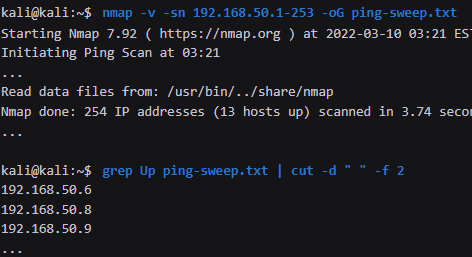
### Grepable Nmap output:
```
nmap -v -sn 192.168.50.1-253 -oG ping-sweep.txt
grep Up ping-sweep.txt | cut -d " " -f 2
```
### Guess OS of machine:
```
sudo nmap -O 192.168.50.14 --osscan-guess
```
-A is for getting service details:
```
nmap -sT -A 192.168.50.14
```
### Get HTTP headers
```
nmap --script http-headers 192.168.50.6
```
### Nmap Services Mapping
```
cat /usr/share/nmap/nmap-services
```
### Powershell One-Liner:
```
Test-NetConnection -Port 445 192.168.50.151
```
One-liner for Powershall scanning of 1024 TCP Ports:
```
1..1024 | % {echo ((New-Object Net.Sockets.TcpClient).Connect("192.168.50.151", $_)) "TCP port $_ is open"} 2>$null
```
## References